
Managing Remotes & Sync
Remote
A remote refers to a separate Proxmox Backup Server installation and a user
on that installation, from which you can sync datastores to a local datastore
with a Sync Job. You can configure remotes in the web interface, under
Configuration -> Remotes. Alternatively, you can use the remote
subcommand. The configuration information for remotes is stored in the file
/etc/proxmox-backup/remote.cfg.
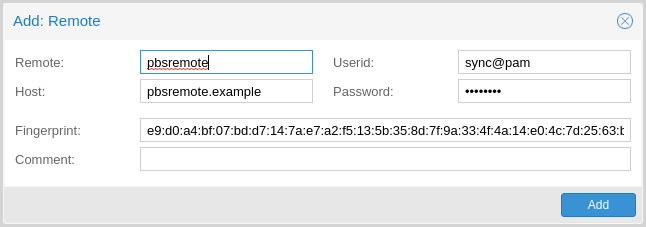
To add a remote, you need its hostname or IP address, a userid and password on
the remote, and its certificate fingerprint. To get the fingerprint, use the
proxmox-backup-manager cert info command on the remote, or navigate to
Dashboard in the remote's web interface and select Show Fingerprint.
# proxmox-backup-manager cert info |grep Fingerprint
Fingerprint (sha256): 64:d3:ff:3a:50:38:53:5a:9b:f7:50:...:ab:fe
Using the information specified above, you can add a remote from the Remotes configuration panel, or by using the command:
# proxmox-backup-manager remote create pbs2 --host pbs2.mydomain.example --userid sync@pam --password 'SECRET' --fingerprint 64:d3:ff:3a:50:38:53:5a:9b:f7:50:...:ab:fe
Use the list, show, update, remove subcommands of
proxmox-backup-manager remote to manage your remotes:
# proxmox-backup-manager remote update pbs2 --host pbs2.example
# proxmox-backup-manager remote list
┌──────┬──────────────┬──────────┬───────────────────────────────────────────┬─────────┐
│ name │ host         │ userid   │ fingerprint                               │ comment │
╞══════╪══════════════╪══════════╪═══════════════════════════════════════════╪═════════╡
│ pbs2 │ pbs2.example │ sync@pam │64:d3:ff:3a:50:38:53:5a:9b:f7:50:...:ab:fe │         │
└──────┴──────────────┴──────────┴───────────────────────────────────────────┴─────────┘
# proxmox-backup-manager remote remove pbs2
Sync Jobs
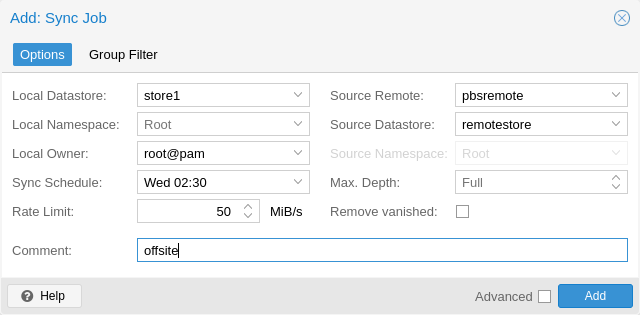
Sync jobs are configured to pull the contents of a datastore on a Remote to
a local datastore. You can manage sync jobs in the web interface, from the
Sync Jobs tab of the Datastore panel or from that of the Datastore
itself. Alternatively, you can manage them with the proxmox-backup-manager
sync-job command. The configuration information for sync jobs is stored at
/etc/proxmox-backup/sync.cfg. To create a new sync job, click the add button
in the GUI, or use the create subcommand. After creating a sync job, you can
start it manually from the GUI, use the run subcommand, or provide it with
a schedule (see Calendar Events) to run regularly.
Backup snapshots, groups and namespaces which are no longer available on the
Remote datastore can be removed from the local datastore as well by setting
the remove-vanished option for the sync job.
Setting the verified-only or encrypted-only flags allows to limit the
sync jobs to backup snapshots which have been verified or encrypted,
respectively. This is particularly of interest when sending backups to a less
trusted remote backup server.
# proxmox-backup-manager sync-job create pbs2-local --remote pbs2 --remote-store local --store local --schedule 'Wed 02:30'
# proxmox-backup-manager sync-job update pbs2-local --comment 'offsite'
# proxmox-backup-manager sync-job list
┌────────────┬───────┬────────┬──────────────┬───────────┬─────────┐
│ id         │ store │ remote │ remote-store │ schedule  │ comment │
╞════════════╪═══════╪════════╪══════════════╪═══════════╪═════════╡
│ pbs2-local │ local │ pbs2   │ local        │ Wed 02:30 │ offsite │
└────────────┴───────┴────────┴──────────────┴───────────┴─────────┘
# proxmox-backup-manager sync-job run pbs2-local
Starting datastore sync job 'pbs2:local:local::pbs2-local'
sync datastore 'local' from 'pbs2/local'
----
Syncing datastore 'local', root namespace into datastore 'local', root namespace
found 0 groups to sync (out of 0 total)
Finished syncing root namespace, current progress: 0 groups, 0 snapshots
Summary: sync job found no new data to pull
sync job 'pbs2:local:local::pbs2-local' end
queued notification (id=a8ce89b5-330a-4ad7-9906-3a876e7ed174)
TASK OK
# proxmox-backup-manager sync-job remove pbs2-local
To set up sync jobs, the configuring user needs the following permissions:
Remote.Readon the/remote/{remote}/{remote-store}pathAt least
Datastore.Backupon the local target datastore (/datastore/{store})
Note
A sync job can only sync backup groups that the configured remote's
user/API token can read. If a remote is configured with a user/API token that
only has Datastore.Backup privileges, only the limited set of accessible
snapshots owned by that user/API token can be synced.
If the remove-vanished option is set, Datastore.Prune is required on
the local datastore as well. If the owner option is not set (defaulting to
root@pam) or is set to something other than the configuring user,
Datastore.Modify is required as well.
If the group-filter option is set, only backup groups matching at least one
of the specified criteria are synced. The available criteria are:
- Backup type, for example, to only sync groups of the ct (Container) type:
# proxmox-backup-manager sync-job update ID --group-filter type:ct
- Full group identifier, to sync a specific backup group:
# proxmox-backup-manager sync-job update ID --group-filter group:vm/100
- Regular expression, matched against the full group identifier
# proxmox-backup-manager sync-job update ID --group-filter regex:'^vm/1\d{2,3}$'
The same filter is applied to local groups, for handling of the
remove-vanished option.
A group-filter can be inverted by prepending exclude: to it.
- Regular expression example, excluding the match:
# proxmox-backup-manager sync-job update ID --group-filter exclude:regex:'^vm/1\d{2,3}$'
For mixing include and exclude filter, following rules apply:
no filters: all backup groups
include: only those matching the include filters
exclude: all but those matching the exclude filters
both: those matching the include filters, but without those matching the exclude filters
Note
The protected flag of remote backup snapshots will not be synced.
Enabling the advanced option 'resync-corrupt' will re-sync all snapshots that have failed to verify during the last Verification. Hence, a verification job needs to be run before a sync job with 'resync-corrupt' can be carried out. Be aware that a 'resync-corrupt'-job needs to check the manifests of all snapshots in a datastore and might take much longer than regular sync jobs.
If the run-on-mount flag is set, the sync job will be automatically started whenever a
relevant removable datastore is mounted. If mounting a removable datastore would start
multiple sync jobs, these jobs will be run sequentially in alphabetical order based on
their ID.
If the unmount-on-done flag is set, the datastore will be automatically unmounted
after the sync job finishes. This option is only available for sync jobs triggered by
mounting (run-on-mount), enabling fully automated external drive workflows.
Setting the worker-threads option to a value greater than 1 (up to 32,
default 1) synchronizes multiple backup groups in parallel. This can
significantly improve throughput on high-latency connections, where a single
HTTP/2 connection to the source is otherwise bottlenecked by head-of-line
blocking. Log output from concurrent groups is prefixed with the group and
buffered briefly to keep related lines together. Note that the memory and
connection count on both endpoints grow roughly linearly with the number of
workers, so higher values are not always better.
Namespace Support
Sync jobs can be configured to not only sync datastores, but also subsets of datastores in the form of namespaces or namespace sub-trees. The following parameters influence how namespaces are treated as part of a sync job's execution:
remote-ns: the remote namespace anchor (default: the root namespace)ns: the local namespace anchor (default: the root namespace)max-depth: whether to recursively iterate over sub-namespaces of the remote namespace anchor (default: None)
If max-depth is set to 0, groups are synced from remote-ns into
ns, without any recursion. If it is set to None (left empty), recursion
depth will depend on the value of remote-ns and the remote side's
availability of namespace support:
remote-nsset to something other than the root namespace: remote must support namespaces, full recursion starting atremote-ns.remote-nsset to root namespace and remote supports namespaces: full recursion starting at root namespace.remote-nsset to root namespace and remote does not support namespaces: backwards-compat mode, only root namespace will be synced intons, no recursion.
Any other value of max-depth will limit recursion to at most max-depth
levels, for example: remote-ns set to location_a/department_b and
max-depth set to 1 will result in location_a/department_b and at most
one more level of sub-namespaces being synced.
The namespace tree starting at remote-ns will be mapped into ns up to a
depth of max-depth.
For example, with the following namespaces at the remote side:
location_a
location_a/department_x
location_a/department_x/team_one
location_a/department_x/team_two
location_a/department_y
location_a/department_y/team_one
location_a/department_y/team_two
location_b
and remote-ns being set to location_a/department_x and ns set to
location_a_dep_x resulting in the following namespace tree on the sync
target:
location_a_dep_x (containing the remote's location_a/department_x)
location_a_dep_x/team_one (containing the remote's location_a/department_x/team_one)
location_a_dep_x/team_two (containing the remote's location_a/department_x/team_two)
with the rest of the remote namespaces and groups not being synced (by this sync job).
If a remote namespace is included in the sync job scope, but does not exist locally, it will be created (provided the sync job owner has sufficient privileges).
If the remove-vanished option is set, namespaces that are included in the
sync job scope but only exist locally are treated as vanished and removed
(provided the sync job owner has sufficient privileges).
Note
All other limitations on sync scope (such as remote user/API token privileges, group filters) also apply for sync jobs involving one or multiple namespaces.
Bandwidth Limit
Syncing a datastore to an archive can produce a lot of traffic and impact other
users of the network. In order to avoid network or storage congestion, you can
limit the bandwidth of a sync job in pull direction by setting the rate-in
option either in the web interface or using the proxmox-backup-manager
command-line tool:
# proxmox-backup-manager sync-job update ID --rate-in 20MiB
For sync jobs in push direction use the rate-out option instead. To allow
for traffic bursts, you can set the size of the token bucket filter used for
traffic limiting via burst-in or burst-out parameters.
Sync Direction Push
Sync jobs can be configured for pull or push direction. Sync jobs in push direction are not identical in behaviour because of the limited access to the target datastore via the remote servers API. Most notably, pushed content will always be owned by the user configured in the remote configuration, being independent from the local user as configured in the sync job. Latter is used exclusively for permission check and scope checks on the pushing side.
Note
It is strongly advised to create a dedicated remote configuration for each individual sync job in push direction, using a dedicated user on the remote. Otherwise, sync jobs pushing to the same target might remove each others snapshots and/or groups, if the remove vanished flag is set or skip snapshots if the backup time is not incremental. This is because the backup groups on the target are owned by the user given in the remote configuration.
The following permissions are required for a sync job in push direction:
Remote.Auditon/remote/{remote}andRemote.DatastoreBackupon/remote/{remote}/{remote-store}/{remote-ns}path or subnamespace.At least
Datastore.ReadandDatastore.Auditon the local source datastore namespace (/datastore/{store}/{ns}) orDatastore.Backupif owner of the sync job.Remote.DatastorePruneon/remote/{remote}/{remote-store}/{remote-ns}path to remove vanished snapshots and groups. Make sure to use a dedicated remote for each sync job in push direction as noted above.Remote.DatastoreModifyon/remote/{remote}/{remote-store}/{remote-ns}path to remove vanished namespaces. A remote user with limited access should be used on the remote backup server instance. Consider the implications as noted below.
Note
Remote.DatastoreModify will allow to remove whole namespaces on the
remote target datastore, independent of ownership. Make sure the user as
configured in remote.cfg has limited permissions on the remote side.
Note
Sync jobs in push direction require namespace support on the remote Proxmox Backup Server instance (minimum version 2.2).
Server Side Encryption/Decryption During Sync
Sync job in push direction allow to encrypt unencrypted snapshots when syncing to a less trusted remote Proxmox Backup Server instance. For this, a server side encryption key can be assigned to the sync job. This key will then be used to encrypt the contents before pushing them to the remote, analogous to performing a backup with an encryption key. Already encrypted snapshots are not re-encrypted but rather pushed unmodified. Snapshots containing only partially encrypted contents are skipped for security reasons.
Therefore, sync jobs using the encrypted-only flag will never use the
active-encryption-key when pushing snapshots, since only already encrypted
snapshots are being synced.
On the other hand, sync jobs in pull direction allow to assign a number of associated keys, which will be used to decrypt snapshot contents if the key fingerprint of one of the listed keys matches the one used to encrypt the backup snapshot. The active encryption key has no effect for sync jobs in pull direction and should not be set.
In order to configure the sync job, as well as for sync job owner/local user
to access the keys during sync, System.Modify permissions are required on
the /system/encryption-keys/{key} path.
Note
Encryption key handling comes with a few risks, especially with key rotation. Therefore, only active keys can be used to encrypt new snapshot contents during push sync. If an active encryption key is changed, the key is kept back as associated key on the sync job, in order to protect it from accidental removal. Further, any encryption key can be archived, rendering it no longer usable for encryption, only to decrypt pre-existing contents. Any encryption key usable for sync jobs must therefore be marked as archived and disassociated from any sync job still associated to it, before being able to remove it.
The following command can be used to assign the active encryption key for a sync job.
# proxmox-backup-manager sync-job update pbs2-push --active-encryption-key key0
Setting the associated keys will drop any key not present in the given key list,
with exception of the previously assigned active encryption key, if it is updated
as well. The previously assigned encryption key (in the example above key0)
will always be pushed to the list of associated keys on rotation. For example,
since key0 is currently the active encryption key, below command would assign
key1 as the new active encryption key and result in key0,key2,key3 as
associated keys for the sync job.
# proxmox-backup-manager sync-job update pbs2-push --active-encryption-key key1 --associated-key key2 --associated-key key3